# Defaults for isc-dhcp-server (sourced by /etc/init.d/isc-dhcp-server)

# Path to dhcpd's config file (default: /etc/dhcp/dhcpd.conf).
#DHCPDv4_CONF=/etc/dhcp/dhcpd.conf
#DHCPDv6_CONF=/etc/dhcp/dhcpd6.conf

# Path to dhcpd's PID file (default: /var/run/dhcpd.pid).
#DHCPDv4_PID=/var/run/dhcpd.pid
#DHCPDv6_PID=/var/run/dhcpd6.pid

# Additional options to start dhcpd with.
#	Don't use options -cf or -pf here; use DHCPD_CONF/ DHCPD_PID instead
#OPTIONS=""

# On what interfaces should the DHCP server (dhcpd) serve DHCP requests?
#	Separate multiple interfaces with spaces, e.g. "eth0 eth1".
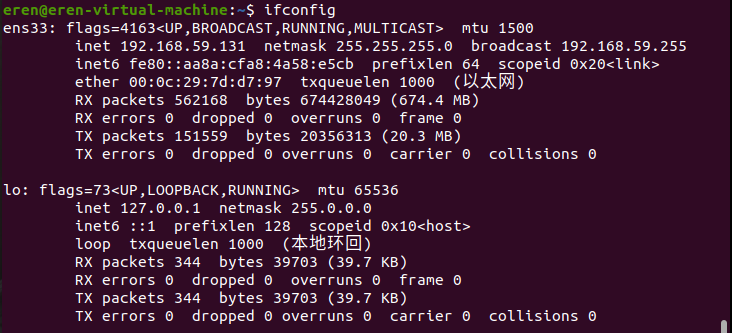
INTERFACESv4="ens33"
INTERFACESv6=""
# dhcpd.conf # # Sample configuration file for ISC dhcpd # # Attention: If /etc/ltsp/dhcpd.conf exists, that will be used as # configuration file instead of this file. #
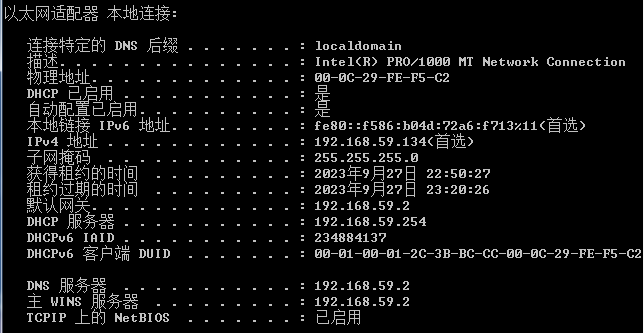
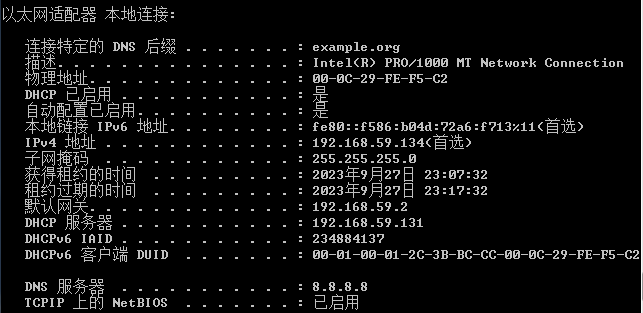
# option definitions common to all supported networks... option domain-name "example.org"; option domain-name-servers 8.8.8.8;
# The ddns-updates-style parameter controls whether or not the server will # attempt to do a DNS update when a lease is confirmed. We default to the # behavior of the version 2 packages ('none', since DHCP v2 didn't # have support for DDNS.) ddns-update-style none;
# If this DHCP server is the official DHCP server for the local # network, the authoritative directive should be uncommented. authoritative;
# Use this to send dhcp log messages to a different log file (you also # have to hack syslog.conf to complete the redirection). # log-facility local7;
# No service will be given on this subnet, but declaring it helps the # DHCP server to understand the network topology.
# A slightly different configuration for an internal subnet. #subnet 10.5.5.0 netmask 255.255.255.224 { # range 10.5.5.26 10.5.5.30; # option domain-name-servers ns1.internal.example.org; # option domain-name "internal.example.org"; # option subnet-mask 255.255.255.224; # option routers 10.5.5.1; # option broadcast-address 10.5.5.31; # default-lease-time 600; # max-lease-time 7200; #}
# Hosts which require special configuration options can be listed in # host statements. If no address is specified, the address will be # allocated dynamically (if possible), but the host-specific information # will still come from the host declaration.
# Fixed IP addresses can also be specified for hosts. These addresses # should not also be listed as being available for dynamic assignment. # Hosts for which fixed IP addresses have been specified can boot using # BOOTP or DHCP. Hosts for which no fixed address is specified can only # be booted with DHCP, unless there is an address range on the subnet # to which a BOOTP client is connected which has the dynamic-bootp flag # set. #host fantasia { # hardware ethernet 08:00:07:26:c0:a5; # fixed-address fantasia.example.com; #}
# You can declare a class of clients and then do address allocation # based on that. The example below shows a case where all clients # in a certain class get addresses on the 10.17.224/24 subnet, and all # other clients get addresses on the 10.0.29/24 subnet.
#class "foo" { # match if substring (option vendor-class-identifier, 0, 4) = "SUNW"; #}
#shared-network 224-29 { # subnet 10.17.224.0 netmask 255.255.255.0 { # option routers rtr-224.example.org; # } # subnet 10.0.29.0 netmask 255.255.255.0 { # option routers rtr-29.example.org; # } # pool { # allow members of "foo"; # range 10.17.224.10 10.17.224.250; # } # pool { # deny members of "foo"; # range 10.0.29.10 10.0.29.230; # } #}



 wechat